LUnit



A unit testing framework for LabVIEW, built on the xUnit industry standard and inspired by JKI VI Tester. LUnit helps you test-drive your LabVIEW development with a fast, tightly integrated workflow.
Full documentation: lunit.astemes.com
Features
- Best-in-class test execution speed (see Benchmark)
- Clear and informative results view
- Run specific tests quickly from the right-click menu
- Test results visible directly in the LabVIEW project
- Instant loading of the UI
- Parallel test execution managed by the framework
- Profiling tools for test execution time and code coverage
- Native CLI and first-class CI support
- LabVIEW API for extension and integration
- Plugin architecture which allows extenssion through add-ons
Prerequisites
- LabVIEW 2020 (32-bit), LabVIEW 2020 SP1 (64-bit), or any later version.
Installation
The recommended way to install LUnit is via VI Package Manager (VIPM). This installs the latest stable release.
Pre-release builds (ahead of what is on VIPM) are published on the GitHub Releases page as VIPM packages that can be installed manually through VIPM.
Getting started
Once installed, LUnit is integrated into the LabVIEW development environment and is accessed through the Tools → LUnit menu. From there you can create new tests or open the LUnit UI to run them.
Creating tests
Create a Test Case class, then add test VIs either from the provided template or by adding any public VI to the Test Case class.
Static dispatch is recommended unless you are using the test inheritance add-on — static dispatch has less overhead and does not lock the Test Case classes when the UI is loaded.
As of LUnit 2.0, test VIs can be named freely. For compatibility with LUnit 1.x, test VI names must begin with test.
Running tests
Tests can be run in several ways:
- Run a single test VI — press the run arrow in LabVIEW (LUnit 1.5+).
- Run all tests in a Test Case — right-click the Test Case in the project explorer and select
Run Test Case…. - Run all tests in a project — use the toolbar button added to the LabVIEW Project Explorer.
- Run from the command line / CI — see the LUnit CLI or LUnit for G-CLI
Benchmark
Test execution speed is really best-in-class. The chart below compares LUnit against two other popular LabVIEW unit testing toolkits on a benchmark of 160 empty tests across 20 Test Case classes, so only framework overhead is measured. Times are averages over 5 runs started from each framework's Run All feature. The benchmark source is available here.
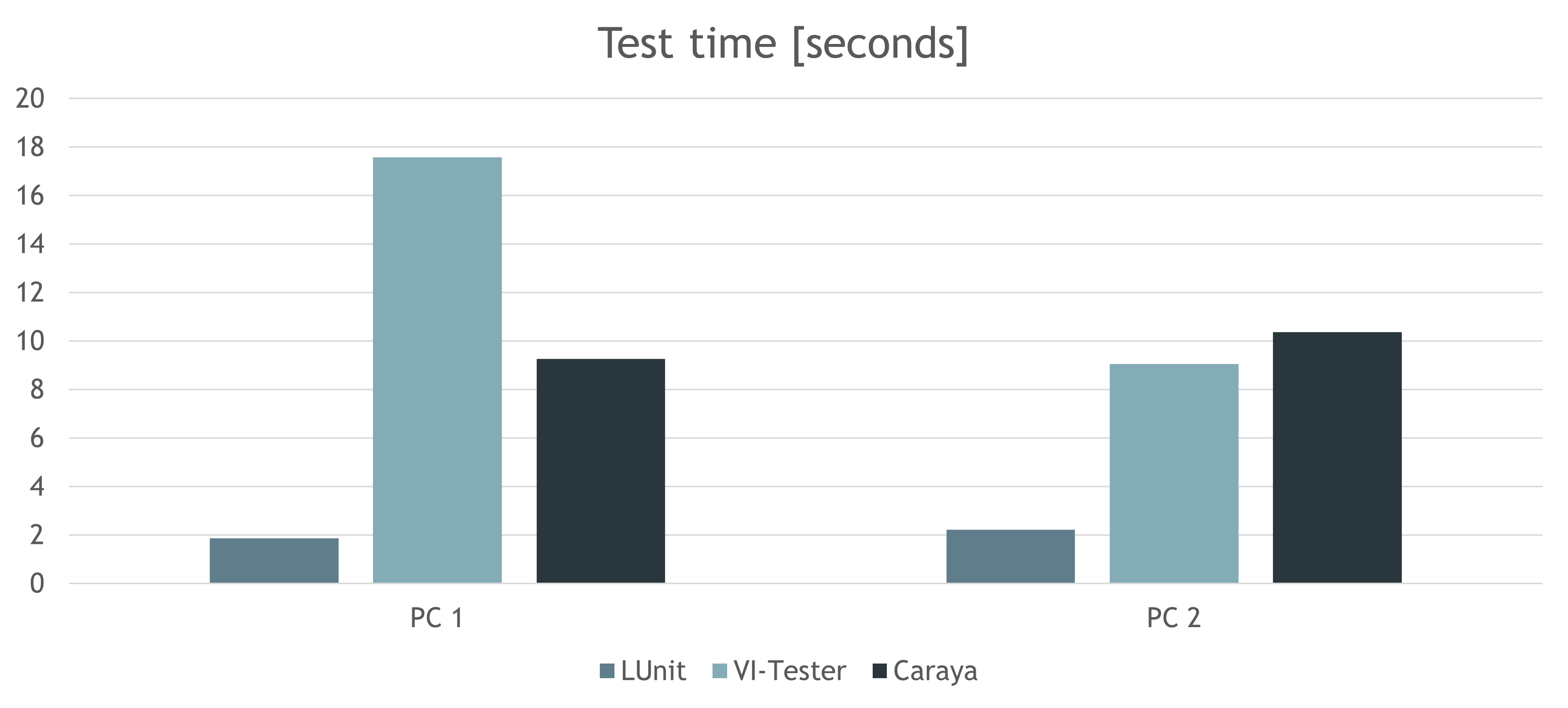
Results come from two test environments — your numbers will differ with other setups, but the conclusion holds: LUnit is roughly 2–10× faster than other available tools. If you see significantly different results, please get in touch.
Documentation & learning resources
- Full documentation: lunit.astemes.com
- 15-minute demonstration and introduction (2024)
- GLA Summit 2021 presentation (somewhat dated)
Examples
A few examples are installed with LUnit and can be found in the NI Example Finder by searching for LUnit. They are installed by default under:
C:\Program Files (x86)\National Instruments\LabVIEW 20XX\examples\Astemes\LUnit
Is it free and open source?
Yes, absolutely. LUnit is released by Astemes under the MIT license. If you find it useful, please consider starring the project on GitHub and VIPM.
Versioning and upgrade notes
LUnit uses semantic versioning in the form major.minor.fix.build:
- Build — build number, no significance beyond identification.
- Fix — bug fixes, minor features, and improvements. Released continuously to GitHub via CD.
- Minor — non-breaking updates. Published to VIPM after an initial testing period. No client code changes should be needed.
- Major — may require changes to code developed against earlier versions. No major updates are currently planned.
Upgrading from 1.x to 2.x
LUnit 2.0 removed the requirement that test VI names begin with test. The change is non-breaking: LUnit 2.x can run tests written for 1.x and vice versa, but tests without the test prefix will not be discovered by LUnit 1.x, so downstream users of your tests must upgrade to run them.
The design of the Reporting Plugin interface was simplified in 2.x, and any custom report plugin made for LUnit 1.x needs to be updated for compatibility.
Support
LUnit is provided as-is and without guarantees by Astemes. To report bugs or track progress, use GitHub Issues. If you have a solution in mind, a pull request is very welcome. For paid professional support, contact Astemes directly.
Contributing
If you find LUnit useful, please share it with colleagues and your network to help grow the user base, and consider starring the project on GitHub or VIPM.
For bugs, open an issue. To contribute code, fork the project and open a pull request. See CONTRIBUTING.md for the development stack and process.